How to Grow Shopify Sales Without Six Separate Tools
Over 80 percent of american store owners want a simpler way to handle all their marketing channels from one place. With digital competition rising fast, keeping up with email, ads, and social media can feel like juggling more than you signed up for. This guide breaks down practical steps to help you set up, automate, and optimize your Shopify marketing efforts so you save time and drive real results—without getting overwhelmed.
Table of Contents
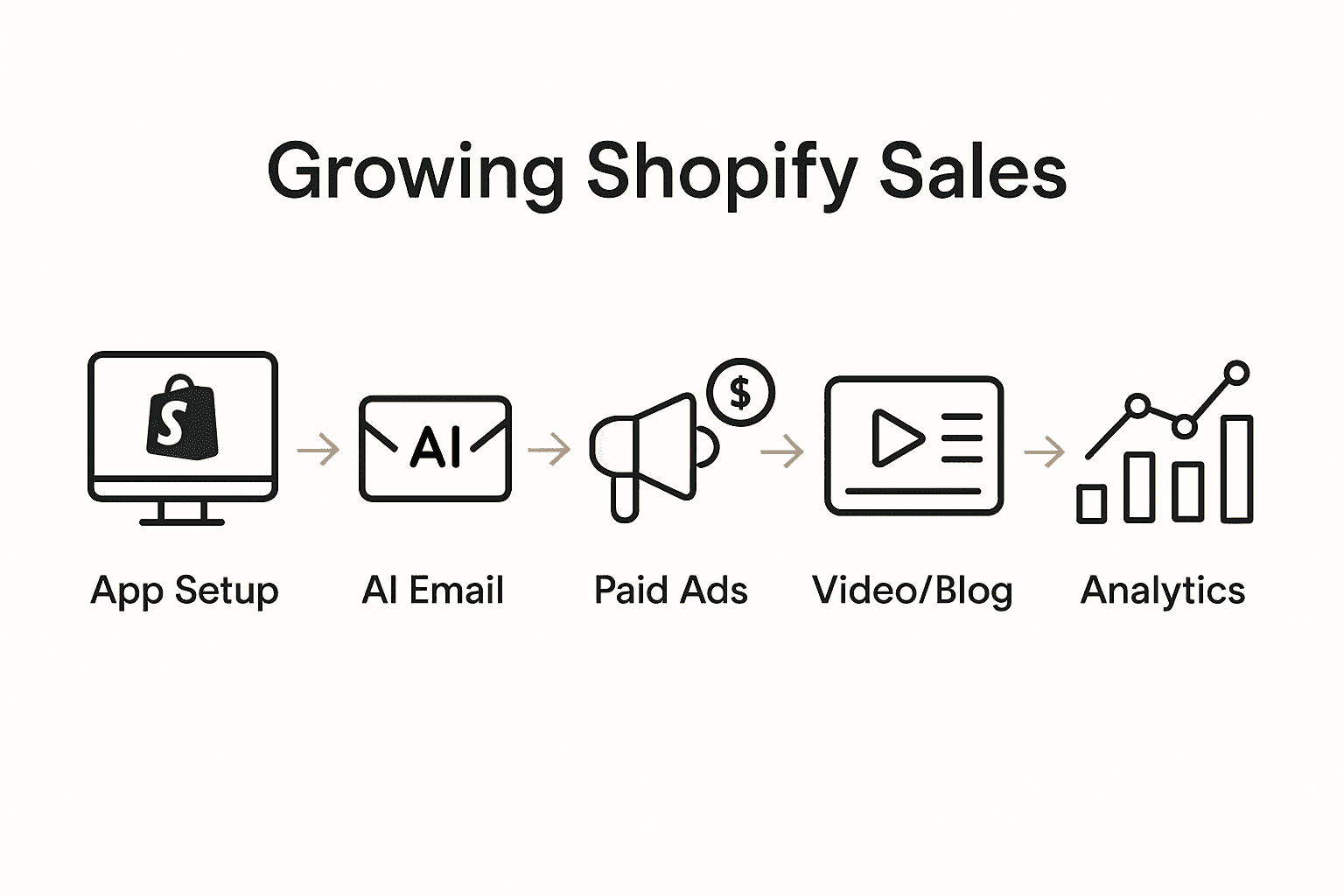
- Step 1: Set Up Your Shopify Marketing App
- Step 2: Automate AI Email Campaigns for Engagement
- Step 3: Launch Effective Paid Ads and Social Posts
- Step 4: Generate High-Converting Video Ads and Blogs
- Step 5: Monitor Results and Optimize Performance
Quick Summary
| Key Takeaway | Explanation |
|---|---|
| 1. Choose a Versatile Marketing App | Select a marketing app that integrates with Shopify and supports multichannel marketing automation for cohesive campaigns. |
| 2. Automate Personalized Email Campaigns | Use AI-driven tools to generate personalized email content based on customer behavior and preferences for better engagement. |
| 3. Launch Effective Paid Ads | Integrate your marketing app with major ad platforms and develop targeted ads to boost traffic and visibility through intelligent marketing techniques. |
| 4. Create Compelling Video Ads and Blogs | Utilize AI tools for content creation that answers customer questions and maintains a consistent brand voice to attract potential customers. |
| 5. Monitor and Optimize Marketing Performance | Regularly track key metrics and use AI analytics to make data-driven adjustments for continuous improvement in marketing strategies. |
Step 1: Set Up Your Shopify Marketing App
Setting up your Shopify marketing app will streamline how you manage digital marketing efforts across multiple channels. By centralizing your marketing tools, you will save significant time and create more cohesive campaigns that reach potential customers effectively.
To begin, log into your Shopify admin dashboard and navigate to the "Apps" section. Search for an all-in-one marketing application that integrates seamlessly with your store. According to Shopify Help, you want a solution that supports multichannel marketing automation and helps you create targeted promotional strategies.
As you explore marketing app options, focus on tools that offer comprehensive features like email marketing, social media posting, paid advertising management, and performance reporting. Look for apps with AI-powered capabilities that can generate content, design ads, and provide actionable insights about your marketing performance. A good marketing app should feel like having an entire digital marketing team working behind the scenes of your Shopify store.
Pro tip: Before finalizing your app selection, always check compatibility with your specific Shopify store version and read user reviews to understand real-world performance and support quality. Each additional feature should genuinely improve your marketing workflow rather than adding unnecessary complexity.
Once you select and install your marketing app, you will be ready to connect your store accounts and start building your first automated marketing campaigns. Your next step will involve configuring initial settings and connecting your communication channels.
Step 2: Automate AI Email Campaigns for Engagement
Automating AI email campaigns will transform how you connect with customers by creating personalized marketing communications that adapt and respond to individual user behaviors. This powerful approach allows you to scale your engagement strategies while maintaining a sense of individual connection.
Start by selecting an AI driven email marketing tool within your Shopify marketing app that can generate dynamic content. Research from arXiv suggests leveraging generative AI with rejection sampling techniques can significantly increase user engagement by creating more relevant and targeted email content. Look for features that allow you to input your brand voice guidelines and target audience characteristics.
Configuring your AI email automation requires strategic segmentation of your customer database. Break down your audience into specific groups based on purchase history, browsing behavior, and engagement levels. Implement machine learning models that can predict user preferences and automatically generate email content that resonates with each segment. According to arXiv, advanced AI models can now incorporate semantic and structural information to create highly personalized email experiences.
Pro tip: Always include an easy unsubscribe option and monitor your email performance metrics closely. Test different AI generated content variations to understand what drives the highest engagement rates for your specific audience.
Once your AI email campaigns are set up and running, you will be ready to track performance and continuously refine your automated marketing strategy.

Step 3: Launch Effective Paid Ads and Social Posts
Launching effective paid ads and social posts will help you reach potential customers across multiple digital platforms and drive targeted traffic to your Shopify store. For more on streamlining workflows, see our role of automation in ecommerce. This strategic approach allows you to amplify your brand visibility and attract more potential buyers through intelligent marketing techniques.
Begin by integrating your marketing app with major advertising platforms like Facebook, Instagram, and Google Ads. According to Shopify Help, utilizing platform specific marketing features can help you send targeted store updates and create post purchase offers that enhance customer engagement. Configure your ad targeting by selecting specific demographics, interests, and behaviors that align closely with your ideal customer profile.
When creating social media content and paid advertisements, focus on developing visually compelling graphics and concise messaging that speaks directly to your audience's needs. Use AI powered tools within your marketing app to generate multiple ad variations and automatically test different creative elements. This approach allows you to quickly identify which content resonates most effectively with your target market, enabling continuous optimization of your marketing strategy.
Pro tip: Set a conservative initial budget for your ads and closely monitor performance metrics. Start with smaller test campaigns to understand your audience response before scaling up your advertising spend.
Once your paid ads and social posts are live, you will be ready to track engagement metrics and refine your marketing approach based on real world performance data.
Step 4: Generate High-Converting Video Ads and Blogs
Generating high-converting video ads and blogs will help you create compelling content that attracts and engages potential customers while showcasing your brand's unique value proposition. This strategic approach transforms your marketing from simple advertising to storytelling that resonates with your target audience.
Leverage AI powered tools within your marketing app to streamline content creation. Vanhishikha emphasizes the importance of crafting compelling narratives and educational content to attract users. Use AI generators to develop initial drafts of blog posts and video scripts that highlight your product's benefits, customer success stories, and unique features. Focus on creating content that answers potential customer questions and solves specific problems your target audience experiences.
When developing video ads, prioritize short, engaging visuals that capture attention within the first few seconds. Utilize AI tools to help you generate multiple content variations and automatically test different creative approaches. According to Fueler, AI driven content optimization can significantly improve your marketing performance by personalizing content to specific audience segments.
Pro tip: Maintain a consistent brand voice across your video ads and blog content. Create a style guide that AI tools can reference to ensure your marketing materials feel cohesive and authentic to your brand identity.
After generating your video ads and blog content, you will be prepared to publish and track their performance across different marketing channels.
Step 5: Monitor Results and Optimize Performance
Monitoring marketing results and continuously optimizing your performance will transform your Shopify store's digital strategy from guesswork into a data driven approach. By systematically tracking key metrics, you can make intelligent adjustments that incrementally improve your marketing effectiveness.
Shopify Help provides comprehensive guidance on reviewing marketing performance metrics within the platform. Configure your marketing app's dashboard to display critical performance indicators such as conversion rates, click through rates, engagement metrics, and return on ad spend. Pay close attention to how different marketing channels perform relative to each other and identify which strategies generate the most valuable customer interactions.
Utilize AI powered analytics tools to dive deeper into your performance data. These advanced tools can help you uncover nuanced insights about customer behavior, predict future trends, and automatically suggest optimization strategies. Focus on understanding not just surface level metrics, but the underlying patterns that drive customer engagement. Analyze metrics like customer lifetime value, acquisition costs, and segmentation performance to develop a more sophisticated understanding of your marketing effectiveness.
Pro tip: Implement a systematic review process where you assess your marketing performance weekly or biweekly. Set specific benchmarks and be prepared to quickly pivot your strategy if certain campaigns are not delivering expected results.
After establishing a robust monitoring and optimization process, you will have created a dynamic marketing approach that continuously improves and adapts to your customers changing needs.
Unlock the Full Potential of Your Shopify Marketing with Tilly
The challenge many Shopify store owners face is managing complex marketing tasks across multiple channels while delivering personalized, engaging content that truly converts. This article highlights key pain points like setting up all-in-one marketing apps, automating AI email campaigns, launching paid ads, and efficiently creating video and blog content. If you want to overcome these hurdles and grow your sales with a seamless, integrated marketing approach Tilly offers the perfect solution.
Our all-in-one marketing app for Shopify stores handles everything discussed here from AI generated email marketing to paid ads social posts and content creation. Imagine simplifying your digital marketing workflow while boosting engagement and tracking results all in one place. With Tilly you get the power of AI automation combined with easy management so you can focus on growing your business instead of juggling tools.
Start transforming your Shopify marketing efforts today with Tilly. Explore our all-in-one marketing app to see how you can automate email campaigns launch targeted ads and generate compelling content effortlessly.
Take control of your store's growth now and experience marketing made simple with Tilly. Visit tillybrand.com to get started and turn your Shopify store into a sales powerhouse.
Frequently Asked Questions
How can I set up an all-in-one marketing app for my Shopify store?
To set up an all-in-one marketing app, log into your Shopify admin dashboard and navigate to the 'Apps' section. Search for a marketing application that integrates easily with your store and supports multichannel marketing. After installation, connect your store accounts to start building automated campaigns.
What features should I look for in a Shopify marketing app?
Look for features such as email marketing, social media posting, paid advertising management, and performance reporting. Additionally, prioritize apps with AI capabilities that can create content and provide insights about your marketing performance.
How do I automate email campaigns to improve customer engagement?
Select an AI-driven email marketing tool that generates personalized email content based on customer behaviors. Segment your audience by their purchasing history and preferences, then set up the tool to send targeted campaigns that resonate with each group.
What steps should I take to launch effective paid ads on Shopify?
Begin by integrating your marketing app with platforms like Facebook, Instagram, and Google Ads. Set specific targeting criteria based on your ideal customer demographics and interest areas to maximize the effectiveness of your advertising efforts.
How can I track the performance of my marketing campaigns?
Utilize analytics within your marketing app to monitor key metrics such as conversion rates and engagement metrics. Regularly review these metrics, ideally every week or biweekly, to identify areas for improvement and pivot your strategy as needed.
What type of content should I create for video ads and blogs?
Focus on creating engaging narratives that highlight your products' benefits and solve potential customer problems. Use AI tools to assist in drafting scripts and blog posts, ensuring your content answers common questions from your audience.